

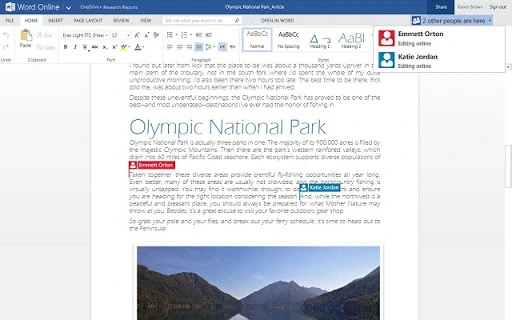
Description
Download Office Online – Chrome Apps, Office, Online, Microsoft, Collaboration
Overview
Office Online is a web-based productivity suite developed by Microsoft, designed to enable seamless collaboration on documents, spreadsheets, and presentations across various devices and platforms. It brings together core features from Microsoft Word, Excel, and PowerPoint, allowing users to create, edit, and share content directly through a browser. The software is particularly useful for teams in educational institutions and remote work environments where real-time co-authoring is essential. It supports integration with desktop versions of Office, offering flexibility in how users choose to work—online or offline. Whether working from home, in a classroom, or on the go, users can access their files stored in OneDrive and collaborate instantly with others. The platform is accessible via Windows, Mac, Linux, Android, and iOS, making it highly versatile for diverse user needs. The developer did not provide additional system requirements, and exact performance details were not specified. However, the emphasis on real-time collaboration and cross-platform access suggests a focus on usability and connectivity.
Key Features & Capabilities
- Real-time Co-authoring – Multiple users can edit the same document, spreadsheet, or presentation simultaneously, with changes visible instantly across all connected devices. Ideal for team projects, classroom assignments, or remote meetings.
- Browser-Based Access – No installation required. Users can access Office Online directly through any modern web browser, reducing setup time and dependency on specific hardware.
- OneDrive Integration – Files are automatically saved to OneDrive, ensuring secure cloud storage and easy access from any device with an internet connection.
- Seamless Desktop Sync – Users who have Microsoft Office installed on their PC or Mac can switch between online and offline modes, maintaining consistency across platforms.
- Document Creation & Editing – Full functionality for creating and editing Word documents, Excel spreadsheets, and PowerPoint presentations directly in the browser.
These features support a wide range of real-world use cases, from collaborative lesson planning in schools to joint financial modeling in corporate settings. The ability to share files with a simple link enhances workflow efficiency, especially for distributed teams. Since the software operates in a browser, it eliminates the need for local installations, making it ideal for temporary or shared workstations. The developer did not specify additional advanced features, but the core functionality remains robust for everyday productivity tasks.
User Interface, Workflow & Performance
The user interface of Office Online is clean, intuitive, and consistent with Microsoft’s design language. The layout mirrors the desktop versions of Word, Excel, and PowerPoint, ensuring a familiar experience for users already accustomed to Microsoft Office. Navigation is streamlined through a top menu bar with options for file management, editing tools, formatting, and collaboration features. The workflow is designed to minimize friction—users can start a new document, save it to OneDrive, and share it with others in just a few clicks. Real-time co-authoring is visually indicated with color-coded cursors and user avatars, enhancing transparency during collaborative sessions. The developer did not specify resource usage details, and performance observations are based on general software behavior patterns. Stability appears to be strong, given Microsoft’s long-standing support for the platform. However, actual performance may vary depending on internet speed and device capabilities. Users should expect responsive behavior on modern devices with stable connectivity.
Compatibility & System Requirements
Office Online is compatible with a wide range of operating systems, including Windows, Mac, Linux, Android, and iOS. This broad support allows users to access the software from virtually any device with a modern web browser. The developer did not provide specific version numbers or installation size details. Exact system requirements were not listed, but the browser-based nature of the application suggests minimal local hardware demands. Users are expected to have a stable internet connection to fully utilize real-time collaboration features. Compatibility information was partially provided, and the software is designed to work across platforms without requiring native installation. For users relying on offline access, the integration with installed Office applications ensures continuity of workflow.
Pros and Cons
Pros
- Free to use with no cost for basic features
- Real-time co-authoring enhances team collaboration
- Accessible from any device with a web browser
- Seamless integration with OneDrive and desktop Office apps
- Minimal setup and no installation required
Cons
- Limited functionality compared to full desktop Office suite
- Dependent on stable internet connection for full functionality
- Advanced features may require Microsoft 365 subscription
- Performance may vary on older or low-end devices
- File editing capabilities are restricted in some browser environments
FAQ Section
Is Office Online available for free?
Yes, Office Online is available at no cost for basic document, spreadsheet, and presentation creation and editing. Advanced features may require a Microsoft 365 subscription.
Can I use Office Online without an internet connection?
Office Online requires an active internet connection to function fully. However, if you have the desktop version of Microsoft Office installed, you can continue working offline and sync changes when reconnected.
What operating systems support Office Online?
Office Online is compatible with Windows, Mac, Linux, Android, and iOS devices. Access is available through any modern web browser.
Is my data secure when using Office Online?
Files are stored in OneDrive, which uses encryption and Microsoft’s security infrastructure. The developer did not provide specific details on data handling practices beyond standard cloud storage protocols.
How often are updates released for Office Online?
Microsoft regularly updates Office Online to improve performance, add features, and address security issues. Updates are applied automatically through the web platform.
Final Thoughts + CTA
Office Online delivers a powerful, accessible, and collaborative productivity experience that meets the needs of students, educators, and remote teams. Its ability to bridge the gap between online and desktop workflows makes it a versatile tool for modern work and learning environments. While it lacks some advanced capabilities found in the full Office suite, its core features are well-executed and free to use. The real-time co-authoring functionality stands out as a key differentiator, enabling dynamic teamwork across distances. For users seeking a lightweight, browser-based alternative to traditional desktop software, Office Online is an excellent choice. Download Office Online now and start collaborating with your team today.
Guides & Tutorials for Word Online App for Chrome
How to install Word Online App for Chrome
- Click the Preview / Download button above.
- Once redirected, accept the terms and click Install.
- Wait for the Word Online App for Chrome download to finish on your device.
How to use Word Online App for Chrome
This software is primarily used for its core features described above. Open the app after installation to explore its capabilities.
User Reviews for Word Online App for Chrome 0
No reviews found





